How MySQL Bug #102266 affects ProxySQL
Overview
If you are using ProxySQL 2.0.16 in front of MySQL 5.7/5.6 servers or even in front of MySQL 8.0.0, please check your ProxySQL error logs for the message below to ensure that you are not experiencing the MySQL bug #102266:
2021-06-23 02:38:18 MySQL_Session.cpp:2798:handler_again___status_CHANGING_USER_SERVER(): Error during change user: 1045, Access denied for user 'mary'@'172.21If you find this error in your log, do not panic, I’m going to share with you how to fix it, but let’s have some context information first.
About the bug
The MySQL bug 102266 was reported reported by Rene on 18 January 2021 and as you can see it affects basically all 5.6, 5.7 versions and 8.0.0 version. As you can the see in the bug report, the issue was fixed on MySQL version 8.1 in March 2017 but it was never back ported to version 5.7. In the current date that I’m writing this post, the latest available version is 5.7.33 and bug fix will be available in version 5.7.35, so I hope it is publicly available soon.
More information:
https://bugs.mysql.com/bug.php?id=102266
Troubleshooting
Recently we worked on a customer ticket with exactly the same issue, so the first suspicion was a misconfigured password between ProxySQL and MySQL, but it was correct configured. You can use the commands bellow to check in your environment, basically you have to check if the hashes are equal:
ProxySQL
mysql> select username, password from mysql_users where username in ('john', 'mary');
+----------+-------------------------------------------+
| username | password                                  |
+----------+-------------------------------------------+
| john     | *DACDE7F5744D3CB439B40D938673B8240B824853 |
| mary     | *D2AAB33E07275EBED72A81489221555B3935D2E9 |
+----------+-------------------------------------------+
MySQL:
mysql> SELECT user,host,authentication_string FROM mysql.user where user in ('john', 'mary');
+------+------+-------------------------------------------+
| user | host | authentication_string                     |
+------+------+-------------------------------------------+
| john | %    | *DACDE7F5744D3CB439B40D938673B8240B824853 |
| mary | %    | *D2AAB33E07275EBED72A81489221555B3935D2E9 |
+------+------+-------------------------------------------+
So after the sanity checks, the most probable reason was the issue 3276 reported in ProxySQL repository on github. The recommendation for the customer was upgrade to versions 2.0.17, 2.1.1 or 2.2.0. So the customer upgraded his environment to version 2.0.17 and the error stopped immediately.
So in summary, if you are reproducing this bug in your environment using ProxySQL probably your application is using:
-
Connector compiled with libmysqlclient 8 or using libmysqlclient 8 directly
-
Character set utf8mb4 and default collation or one of new MySQL 8 collations
-
Any of MySQL Versions reported in the bug
-
ProxySQL 2.0.16
Double check if your connector is based on libmysqlclient:
https://dev.mysql.com/doc/refman/8.0/en/connectors-apis.html
Double check the new collations in MySQL 8.0:
https://mysqlserverteam.com/new-collations-in-mysql-8-0-0/
Read more details about the ProxySQL 2.0.16 issue:
https://github.com/sysown/proxysql/issues/3276
Reproducing the issue in ProxySQL
I setup a new environment to see the bug affecting ProxySQL 2.0.16. The provisioned environment is quite simple, basically there is only one ProxySQL Instance running version 2.0.16 and one MySQL Community running version 5.7.32. In MySQL there are two users that will be used to reproduce the error.
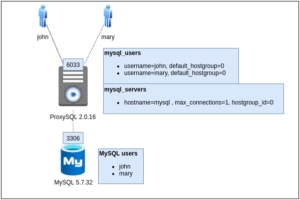
Step 1. Setup ProxySQL and load the configuration, you can find more details how to install ProxySQL in https://proxysql.com/documentation/installing-proxysql/.
INSERT INTO mysql_servers (hostgroup_id,hostname,port,max_connections) VALUES (0,'mysql',3306, 1);
LOAD MYSQL SERVERS TO RUNTIME;
SAVE MYSQL SERVERS TO DISK;
INSERT INTO mysql_users (username,password,active,default_hostgroup) values ('john', 'john', 1,0);
INSERT INTO mysql_users (username,password,active,default_hostgroup) values ('mary', 'mary', 1,0);
LOAD MYSQL USERS TO RUNTIME;
SAVE MYSQL USERS TO DISK;
Step 2. You can use the code below to run the test. So it basically open a connection with username john, set a character set and collation, run a simple query and afterwards it close the connection. In order to ProxySQL runs the COM_CHANGE_USER in MySQL, the code opens a new connection but now with username mary and try to run the same query again.
#include <stdlib.h>
#include <mysql/mysql.h>
int main() {
  MYSQL mysql;

  mysql_init(&mysql);
  fprintf(stderr, "Setting charset utf8mb4\n");
  mysql_options(&mysql, MYSQL_SET_CHARSET_NAME, "utf8mb4");
  if (!mysql_real_connect(&mysql,"127.0.0.1","john","john","information_schema",6033,NULL,0)) {
    fprintf(stderr, "Failed to connect to database: Error: %s\n",
    mysql_error(&mysql));
    return 1;

  }
  fprintf(stderr, "Server version: %s\n", mysql.server_version);

  const char * query = "SET NAMES utf8mb4 COLLATE utf8mb4_unicode_ci";
  fprintf(stderr, "Running query: %s\n", query);
  if (mysql_query(&mysql, query)) {
     fprintf(stderr, "Failed to run query: Error: %s\n",
     mysql_error(&mysql));
     return 1;

  }

  query = "SHOW VARIABLES LIKE '%coll%'";
  fprintf(stderr, "Running query: %s\n", query);
  if (mysql_query(&mysql, query)) {
    fprintf(stderr, "Failed to run query: Error: %s\n",
    mysql_error(&mysql));
    return 1;
  }

  MYSQL_RES *result = mysql_store_result(&mysql);
  MYSQL_ROW row;
  fprintf(stderr, "Result:\n");
  while ((row = mysql_fetch_row(result))) {
    fprintf(stderr, "%s = %s\n", row[0], row[1] ? row[1] : "NULL");
  }
  mysql_close(&mysql);

  // open a new connection but with a different user, so proxysql reuse it and run COM_CHANGE_USER
  fprintf(stderr, "Setting charset utf8mb4\n");
  mysql_options(&mysql, MYSQL_SET_CHARSET_NAME, "utf8mb4");
  if (!mysql_real_connect(&mysql,"127.0.0.1","mary","mary","information_schema",6033,NULL,0)) {
    fprintf(stderr, "Failed to connect to database: Error: %s\n",
    mysql_error(&mysql));
    return 1;
  }
  fprintf(stderr, "Server version: %s\n", mysql.server_version);

  fprintf(stderr, "Running query: %s\n", query);
  if (mysql_query(&mysql, query)) {
    fprintf(stderr, "Failed to run query: Error: %s\n",
    mysql_error(&mysql));
    return 1;
  }

  result = mysql_store_result(&mysql);
  fprintf(stderr, "Result:\n");
  while ((row = mysql_fetch_row(result))) {
    fprintf(stderr, "%s = %s\n", row[0], row[1] ? row[1] : "NULL");
  }

  mysql_close(&mysql);
  fprintf(stderr, "All good\n");
  return 0;
}
Step 3. Running the code in ProxySQL 2.0.16
When you run the code above in Proxy 2.0.16 the client connection receives an error when open the second connection. It happens because ProxySQL internally execute COM_CHANGE_USER to MySQL and receive the access denied error.
Setting charset utf8mb4
Server version: 5.5.30
Running query: SET NAMES utf8mb4 COLLATE utf8mb4_unicode_ci
Running query: SHOW VARIABLES LIKE '%coll%'

Result:
collation_connection = utf8mb4_unicode_ci
collation_database = utf8_general_ci
collation_server = utf8mb4_unicode_ci
Setting charset utf8mb4
Server version: 5.5.30

Running query: SHOW VARIABLES LIKE '%coll%'

Failed to run query: Error: Access denied for user 'mary'@'172.21.0.2' (using password: NO)
Checking the ProxySQL log:
2021-06-23 02:38:18 MySQL_Session.cpp:2798:handler_again___status_CHANGING_USER_SERVER():  Error during change user: 1045, Access denied for user 'mary'@'172.21
.0.2' (using password: NO)
2021-06-23 02:38:18 MySQL_Session.cpp:135:kill_query_thread():  KILL CONNECTION 1727 on server01:3306
2021-06-23 02:38:18 MySQL_Thread.cpp:4439:process_all_sessions():  Closing unhealthy client connection 172.21.0.1:46730
Step 3. Running the code in ProxySQL 2.0.17
When you run the same code in Proxy 2.0.17 then ProxySQL are able to reuse the same connection, a warning message about the invalid collation is send to ProxySQL error log, but now no errors are reported in the client connection now.
Setting charset utf8mb4
Server version: 5.5.30
Running query: SET NAMES utf8mb4 COLLATE utf8mb4_unicode_ci
Running query: SHOW VARIABLES LIKE '%coll%'

Result:
collation_connection = utf8mb4_unicode_ci
collation_database = utf8_general_ci
collation_server = utf8mb4_unicode_ci
Setting charset utf8mb4
Server version: 5.5.30

Running query: SHOW VARIABLES LIKE '%coll%'
Result:
collation_connection = utf8_general_ci
collation_database = utf8_general_ci
collation_server = utf8mb4_unicode_ci

All good
Checking the ProxySQL log:
2021-06-23 02:42:02 MySQL_Variables.cpp:294:validate_charset(): Server doesn't support collation (255) utf8mb4_0900_ai_ci. Replacing it with the configured default (33) utf8_general_ci. Client 172.21.0.1:47692CONCLUSION
ProxySQL 2.0.16 was impacted by MySQL bug in an very specific situation, but the version 2.0.17 or later versions mitigate the issue transparently to the application. For MySQL 8 there are many releases options that you can use to avoid the error, but for MySQL 5.7 there isn’t. MySQL team should release 5.7.35 soon and then we have a better situation +1 option to fix the issue. Until there you have can use or upgrade to ProxySQL 2.0.17 or newer versions.
I hope you find this information useful and If you have any questions please do not hesitate to contact us. Our performance and scalability experts are readily available to evaluate the overall state of your database infrastructure and help to build a robust and reliable MySQL HA architecture.